Deploy a website on AWS S3 + CloudFront using Terraform
Project Overview
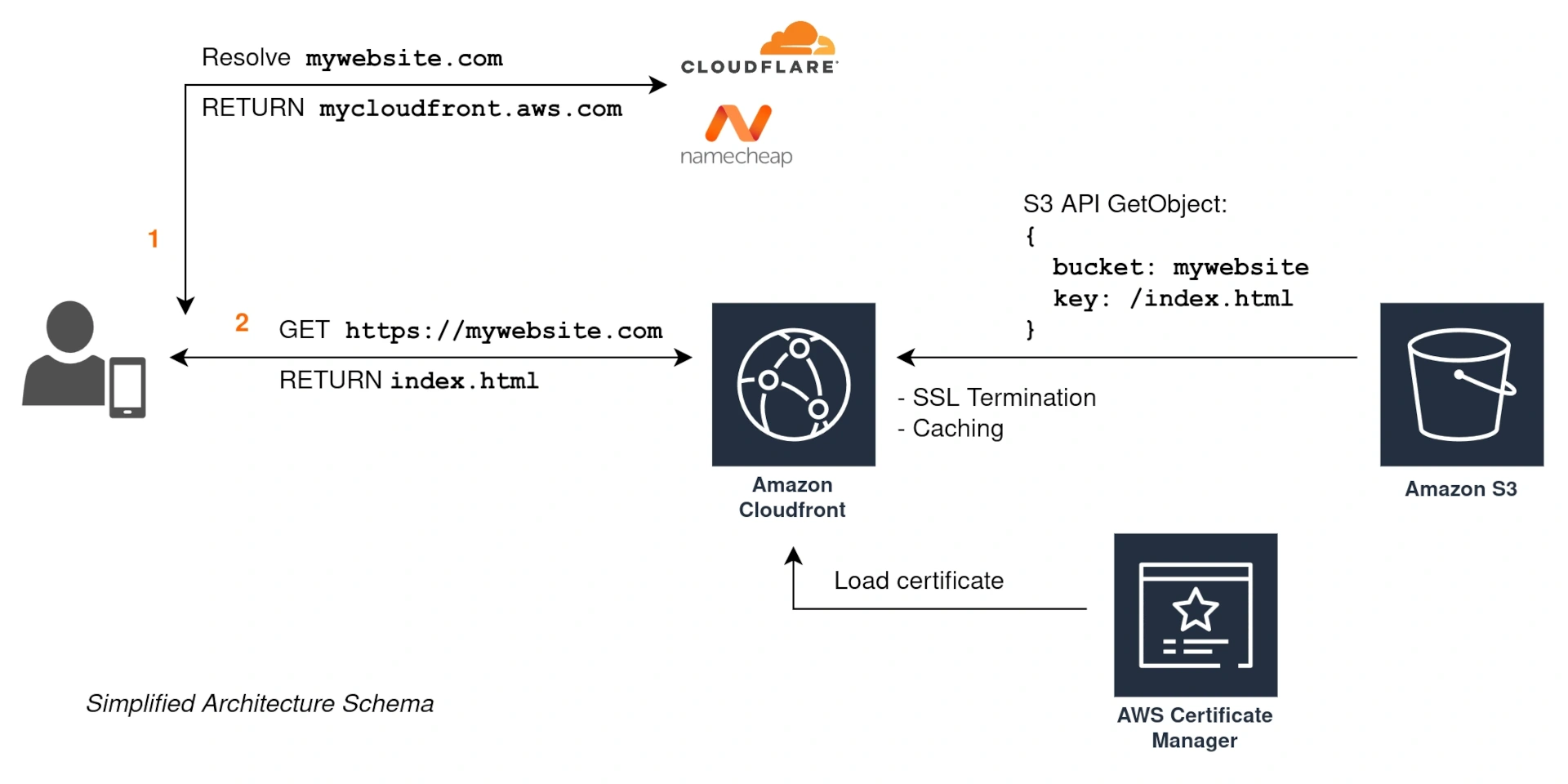
Minimal infrastructure to set up a Single-Page Application (SPA) website on AWS. The website will run at no cost unless there is heavy traffic and it gets past the limits of the AWS Free Tier.
The full code example can be found on GitHub.
Setup the Working Environment
Initially, we will start with the following provider.tf file:
Loading...
When using Terraform, it is considered best practice to store the state file in persistent storage, preferably encrypted. For optimal interoperability, object storage solutions like Amazon S3 are frequently utilized. In this project, we will begin by creating a bucket to hold the Terraform state. After creating the bucket, we will migrate the Terraform state from our local machine to S3. Our initial S3 module is defined as:
Loading...
It will create an S3 bucket, and once created we can update our provider.tf with this block:
Loading...
Terraform will request that we migrate the state file to the new bucket. We can do this by running terraform init -migrate-state.
Enable HTTPS: Issue the ACM certificate
We use the certificate (modules/acm/main.tf) to secure the HTTP traffic between the users and CloudFront. TLS termination occurs at CloudFront, which will establish a new secure connection to the origin if configured. Issuing the certificate is as easy as:
Loading...
Deploy the S3 bucket and CloudFront
The next step is to deploy the infrastructure. This involves creating an S3 bucket for your website and setting up a CloudFront distribution. This setup will help serve your content securely and efficiently. CloudFront delivers your S3-hosted website globally with HTTPS support.
We will create a bucket similar to the Terraform state bucket and block all public access. Access will only be granted through CloudFront using S3 API. Consequently, the bucket webserver and its functionality—such as redirects and error documents—will not work. Therefore, we do not specify an index document or an error document for the S3 bucket; instead, we define these settings within CloudFront itself. Here is part of the modules/s3/main.tf:
Loading...
Make sure to customize CloudFront for your specific use case. The configuration found in modules/cloudfront/main.tf is quite flexible. We assume that a Single-Page Application (SPA) will handle all error messages, which is why we define custom error responses. Additionally, we have disabled IPv6 because, although many ISPs and network devices claim to support it, incorrect implementations lead to connectivity issues.
Loading...
When we execute terraform apply we can retrieve the cloudfront_distribution_domain_name either by defining it as an output in our Terraform configuration or by examining the Terraform State using terraform state list. Next, we will add a CNAME record to our nameserver, pointing it to our domain, so that DNS resolution directs traffic to CloudFront.
Deploy the SPA
After building your SPA, you can deploy it to the S3 bucket using the following command:
Loading...
This command synchronizes the build output with the S3 bucket, ensuring that your website is up to date.
Debugging and next steps
If your website is not being served correctly, and you have verified that the DNS records are correct (for example, with dig or nslookup) you might want to check the CloudFront logs. You can set up an S3 bucket and configure CloudFront to collect the HTTP requests for further analysis.
Once the website is up & running, you might be interested in:
- Adding AWS WAF for enhanced security.
- If you are running a company, reach out to your Account Manager and ask for a well-architected and security review.
- You probably want to add an API next. It can be achieved with many different services; AWS Serverless, AWS ECS, AWS EC2, etc.